
Artis BT-81 Bluetooth Speaker Not Working & Charging LED Not Visible
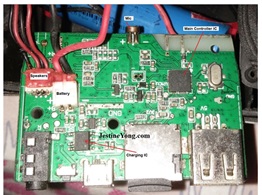
Received again this speaker stating Speaker not working & Charging LED not visible. Earlier I repaired same speakers for the Battery Problem.
Reference: https://jestineyong.com/bluetooth-speakers-turn-off-within-10-minutes/
Opening process already shown in above reference Article so I skip that part. Now on Problem…. I powered the device top indicator light on On/Off switch coming ON but no sound & charging indicator LED is also glowing dim at the same time without charging cable connected. Disassembled the unit for further inspection.


Now checked Voltages on charging section.
Removed Battery Connector it & checked voltage on it, shows 4.3v seems OK.

Checked Voltage On the Charging Connector showing 5v that is also OK.

Also checked Voltages On PCB Battery socket, showing 4.4v seems OK


Inspected PCB for any Damage but seems ok, most of time SMD switches are doubtful so I shorted two pins of the switch marked with V+ on above PCB & suddenly I found loud sound. Cleaned the PCB Using IPA & putt drop of WD40 on all switches and pushed them many times also put drop of WD40 in charging socket & injected charging pin few times. Connected the PCB Back to circuit & powered on now audio working perfect. Also I found there is no charging LED glowing without connecting charging cable.
But found manufacturer give very awkward place for LED indicator it is just a Pin Hole exact over the charging Socket where it is not easily visible when cable is plugged in for charging. & when we install the PCB in the casing LED is facing on top & not in front facing so led Light which is glowing toward top hence visible light through hole is minimal.

So I decided to remove the SMD LED & put 3mm Regular LED & arrange in the body so that it can easily visible. Removed LED but while removing it damaged micro trace on the PCB. connected the external wires –ve on 1K resistor which is connected to –ve point of the LED. & for red wire I scratch the trace going to +ve line of the led & soldered on it. (I used thin wire replacement from my salvaged material box this wired is removed from damaged USB mobile charger cable). In photo (captured by zooming) it looks thick but it is near 1mm of thickness.


Assembled everything back & powered the Unit.
Now Speaker working fine & Led Indicator is also visible.

And Speakers are ready for pick up.


This article was prepared for you by Yogesh Panchal who works as a Computer Hardware Engineer in Mumbai India.
P.S- Do you know of any your friends who would benefit from this content that you are reading now? If so, forward this website to your friends or you can invite your friends to subscribe to my newsletter for free in this Link.
Note: You can check his previous repair articles on Laptop Repaired for Blue Screen Error
 (34)Dislikes
 (0)
(0)
13 Comments
Leave a Reply





Parasuraman S
August 30, 2025 at 4:23 pm
A professional thorough job! Many thanks for sharing!
Yogesh Panchal
August 30, 2025 at 6:26 pm
Thank You! Sir
Waleed Rishmawi
August 30, 2025 at 4:37 pm
good job on the repair and the modification of the device. cleaning the smd buttons is ok but I would rather replace all of them: they are cheap to find and replace. have a blessed day
Yogesh Panchal
August 30, 2025 at 6:34 pm
Agree with You Waleed,
I would have replaced the switch with a new one but the PCB quality is so poor and the traces are so thin that it would cause further damage so thinking this I decided that if cleaning doesn't work then I will have to do this,but luckily it worked.
ANTHONY PATERSON
September 2, 2025 at 1:31 pm
It looks like you used a hot soldering iron to create the hole for the new 3mm LED? An LED housing would have looked more professional. Using WD40 as a switch-cleaner would be a last resort. WD40 make two specialist products:'Contact Cleaner' and a 'Quick Drying Contact Cleaner' which one presumes is better for the task. However, if it works then well done - but for how long?
Albert van Bemmelen
August 30, 2025 at 4:49 pm
Using WD40 for cleaning the internal pushbutton switch contacts is something I never have done yet. Will try it next time when I encounter a similar repair!
Yogesh Panchal
August 30, 2025 at 6:38 pm
Albert,
This type of switches having metal dome inside which gets oxidized in humid environment,WD 40 works great.
Mark J
August 31, 2025 at 4:17 am
Yogesh great repair job. Thank again for sharing.
Yogesh Panchal
August 31, 2025 at 8:02 pm
Your welcome! Mark J
AdamS
September 1, 2025 at 7:03 pm
Great repair, Yogesh, but I wonder if that will be coming back to you again for another repair for bad sound soon - those speaker surrounds look to be in a very bad way!
Yogesh Panchal
September 3, 2025 at 5:26 pm
You are Right AdamS,
Speaker surroundings rubber is degraded, still it sound good.temporary i applied rubber synthetic glue on it,unfortunately sound quality of speaker is very good but build quality is not so good & same type of speakers are not available for replacement in our area i tried few options but physical dimensions of cradle is not matching.discussed it with customer also, he told me he will collect the speakers right now & he will send it back to me when i arrange the replacement.
Imoudu O
September 5, 2025 at 1:08 am
Does the new led automatic switch off when battery is full
Yogesh Panchal
September 5, 2025 at 5:26 pm
Imoudu O,
Yes,that is how it behave by the company design.