
Desktop Computer Repaired And Serviced
Customer visited my place with his computer stating problem, Computer intermittent Making Noise & front USB sockets are not working.

Connected CPU on my setup and powered the computer, it works smoothly for 10 minutes and suddenly grinding Noise started. Most powerful god gift to humans are six senses which helpful to figure out exact location of fault.
The term “six senses” refers to the traditional five senses (sight, hearing, touch, taste, smell) plus a sixth sense, often called proprioception. Noise coming from two cooling fan used back side One is for cabinet & other one is used in SMPS.

Removed both the FAN for servicing.

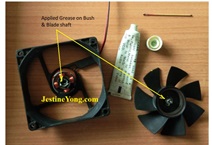
After Cleaning the Fan applied Grease on Bush & Blade shaft.


Now took out front USB plate from the face cover
of the computer for replacing both USB Sockets.


After replacing front USB sockets fitted the plate back to the front face cover.

Now assembled everything & powered the unit now front USB started
working again & FANs also working smooth without any noise.

This article was prepared for you by Yogesh Panchal who works as a Computer Hardware Engineer in Mumbai India.
P.S- Do you know of any your friends who would benefit from this content that you are reading now? If so, forward this website to your friends or you can invite your friends to subscribe to my newsletter for free in this Link.
Note: You can check his previous repair articles on Blue Screen Error In Desktop Computer
 (31)Dislikes
 (0)
(0)
20 Comments
Leave a Reply





Albert van Bemmelen
June 28, 2025 at 6:22 pm
Good job on taking apart the fan's and restoring them. Something I think never did successfully before. Your good fix example here promises me better luck next time a fan needs cleaning and new greasing.
Although replacing them is always the best option for a large free of service time period.
Yogesh Panchal
June 29, 2025 at 5:27 pm
Albert,
Fan cleaning & Greasing is good option rather Replace new FAN in dusty environment.Good luck for next time remember you will learn something new in each attempt.
Anwar Shiekh
June 28, 2025 at 8:07 pm
I use 5W-30 engine oil on fans although it might be better to use an oil without detergents.
Imoudu
June 29, 2025 at 4:54 am
The ears and eyes work together to make a good fix,thanks for sharing sir.
Yogesh Panchal
June 29, 2025 at 5:41 pm
Anwar Shiekh,
5W-30 engine oil is also good option for lubricating fans.infect i use Coconut oil sometime.
Parasuraman S
June 28, 2025 at 8:21 pm
proprioception : A new word learnt from the article! It is a good fix and thanks for sharing with very informative details!
Yogesh Panchal
June 29, 2025 at 5:49 pm
Thank You!Sir,
Proprioception practice is what Arjuna did to hit the target in Mahabharata.
Parasuraman S
June 29, 2025 at 11:34 pm
Yes, I have heard about it and remembered and related to it now!
Waleed Rishmawi
June 28, 2025 at 9:19 pm
Good job on the repair but if I were you I would replace the two fans instead of cleaning them. Have a blessed day
Yogesh Panchal
June 29, 2025 at 5:52 pm
Waleed,
It is matter of Choice to replace or servicing good condition Fans.
Humberto
June 29, 2025 at 2:15 am
When I read the tittle of the article, I said: it's a Yogesh repair. Congratulations
Yogesh Panchal
June 29, 2025 at 5:53 pm
Thank You! Humberto
Mark J
June 29, 2025 at 3:01 am
Yogesh Panchal good job on the repair. Thanks for sharing.
Yogesh Panchal
June 29, 2025 at 5:54 pm
Thank you Mark j
Imoudu
June 29, 2025 at 4:55 am
The ears and eyes work together to make a good fix,thanks for sharing sir.
Yogesh Panchal
June 29, 2025 at 5:54 pm
Thank You!Imoudu
Rajarajan
June 30, 2025 at 12:36 pm
Wow, Can you post step by step instructions for cleaning of fan and greasing them along with photographs.
Yogesh Panchal
July 1, 2025 at 1:25 am
Rajarajan,
process is very simple you will find one rubber cap beneath the sticker,pull up it using needle or knife point. now inside you will find one plastic ring lock remove the plastic ring lock & pull the Fan blade unit out Now clean the dust & old grease from the pin as well from the Bush, Now apply fresh grease &
reassemble the fan... done.. All the best.
Tony Aimer
June 30, 2025 at 3:44 pm
My desktop fan was making a terrible noise.
Got a drop of 3 in 1 type oil in the right place and fan now runs quietly.
SMPS fan next!
"If it moves and should not - use duct tape. If is should move and does not - use 3 in 1"
Very encouraging article
Yogesh Panchal
July 1, 2025 at 1:26 am
Thank you! Tony Aimer