
ASUS Vivobook No Display & Screen Hinge Broken Problem
Received Laptop stating problem of No Display problem & screen broken problem.

On inspection I power On the laptop it starts Caps Lock light comes ON but no display.
Looking at the condition of the laptop it seems that this symptom may be caused by a damaged LVDS cable that goes from the motherboard to the screen. Anyway I need to open the laptop to repair the broken part.


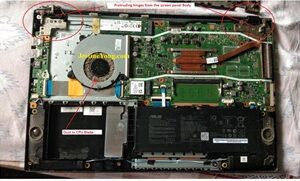
For further inspection I took apart the laptop. And I found that the screen panel is protruding from the body on both the left and right sides.

Before start fixing the hinges I decide to first confirm the cause of no display, so that I can give estimate to the customer accordingly.
First of all, cleaned dust from the laptop.

Now removed LVDS Cable fount oxidized contacts, so cleaned it as well.

Connected everything back to check for display, I powered ON the Laptop & I got the display on the screen.
I moved cable in different direction also taped lightly on the screen but display is firmed. So no display problem is cleared. After obtaining approval of repair cost from the customer for hinge repair process, I started hinge fixing process (Same as I used in my earlier laptop repair article using Baking soda & super Glue…be careful when using liquid glue, a small mistake can spoil your work).
Reference of my old article https://www.electronicsrepairfaq.com/how-to-repair-stuck-dvd-tray-in-dell-laptop

Fixed hinges on its location precisely. This job is very delicate so do not do it if you are in hurry. When fixing Brass stud for screw, some miner millimeter difference will make the repair unsuccessful.

After fixing the hinges I reassembled the laptop & checked hinges working by multiple time closing & opening the Lid.
Now turned ON the Laptop & now it works fine.

Now Laptop is ready for the pickup.


This article was prepared for you by Yogesh Panchal who works as a Computer Hardware Engineer in Mumbai India.
P.S- Do you know of any your friends who would benefit from this content that you are reading now? If so, forward this website to your friends or you can invite your friends to subscribe to my newsletter for free in this Link.
Note: You can check his previous repair articles on Set Top Box Remote Revived
 (40)Dislikes
 (0)
(0)
14 Comments
Leave a Reply





Parasuraman S
July 19, 2025 at 6:34 pm
A variety of problems which you handled with ease and dexterity! Many thanks for sharing, dear Yogesh Bai!
Yogesh Panchal
July 21, 2025 at 3:56 pm
Thank you! sir
Dexterity is because of the confidence to do something, to try something new and to have years of experience and practice & courage to try something by reading other technician experiences.
Waleed Rishmawi
July 19, 2025 at 6:40 pm
Interesting… super glue and baking soda? I usually change the whole thing. Is it strong enough? Have a blessed day
Yogesh Panchal
July 21, 2025 at 4:05 pm
Waleed,
You can try superglue and baking soda or Medical cotton & Superglue both are strong enough to handle these type of work....it need lots of practice because use of excessive superglue sometime worsen the job. i tried many epoxy like Araldite Adhesive but it is not useful in some types of plastics they lets go of the grip after some days.
Albert van Bemmelen
July 19, 2025 at 6:56 pm
Fixing those hinges makes it a harder to fix repair no doubt! Because it requires to open up the entire laptop. I hope the customer will take better care of his Vivobook next time because it almost was beyond repair if screen and hinges already failed working.
Probably why they made Smartphones and Tablets that do not need any hard to fix hinges (lol).
Yogesh Panchal
July 21, 2025 at 4:18 pm
Albert,
Fixing Hinge is very delicate work, because you are bonding metal studs to plastic.The slightest mistake in hinge or stud alignment could damage the screen or damage the plastic body beyond repair.
Smartphones and Tablets are not substitute to Laptop or desktop, they have some limitation for processing.
Humberto
July 19, 2025 at 7:11 pm
Congratulations Yogesh, good repair
Yogesh Panchal
July 21, 2025 at 4:18 pm
Thank you!Humberto
Mark J
July 20, 2025 at 2:57 am
Yogesh I fixed a few laptops with that same problem of the LVDS cable getting caught in the hinges or broken hinges themselves. Good job on the repair.
Yogesh Panchal
July 21, 2025 at 4:24 pm
Mark J,
you are right,Low quality Material, Design & Manufacturing defect are main reason.
Mark
July 20, 2025 at 2:14 pm
Well done Yogesh.
Yogesh Panchal
July 21, 2025 at 4:24 pm
Thank you! Mark
Imoudu
July 21, 2025 at 4:38 am
Good job sir,I avoid the use of super glue though.
Yogesh Panchal
July 21, 2025 at 4:33 pm
Imoudu,
Using superglue requires a lot of practice, as it is in liquid form and will not always be limited to the targeted point of use, it can spread to any nearby part and can make your work more difficult.